
The model ran remotely; we measured the tooling on the VPS. Our small API-based Python runner passed all 63 measured jobs across the three plans. On 2 GB, four browser jobs sharing one Python runner peaked at 954 MiB, with about 704 MiB of available memory at the lowest sample. This was not a local-model or full-framework test.
The tools changed memory use most. A file report and small code repair used much less memory than Chromium.
2 GB worked for these tasks. All 21 jobs on that VPS passed, including the repeated four-browser batches.
Larger plans left more room. Spare memory matters when you add services or heavier pages; it was not required to pass this workload.
The runtime matters. We tested a small Python runner calling a remote model, not local inference or a full agent framework.
How much RAM AI agent tooling needs depends on the runtime and local tools. We compared real 2, 4 and 8 GB VPS plans while a remote API handled model inference. The VPSs ran Python, file operations, tests and Chromium; they did not host an AI model.
The measured memory peaks
Each number below is the highest kernel-recorded workload-group peak across three repeated batches, in MiB, rounded to the nearest whole MiB. These are group charges, including charged cache, not total guest memory use. One MiB is 1,048,576 bytes; the 2, 4 and 8 GB labels identify the VPS plans.
| Workload | 2 GB plan | 4 GB plan | 8 GB plan |
|---|---|---|---|
| File report | 18 | 18 | 18 |
| Code repair | 33 | 33 | 33 |
| One browser job | 258 | 247 | 247 |
| Four browser jobs, shared runner | 954 | 947 | 948 |
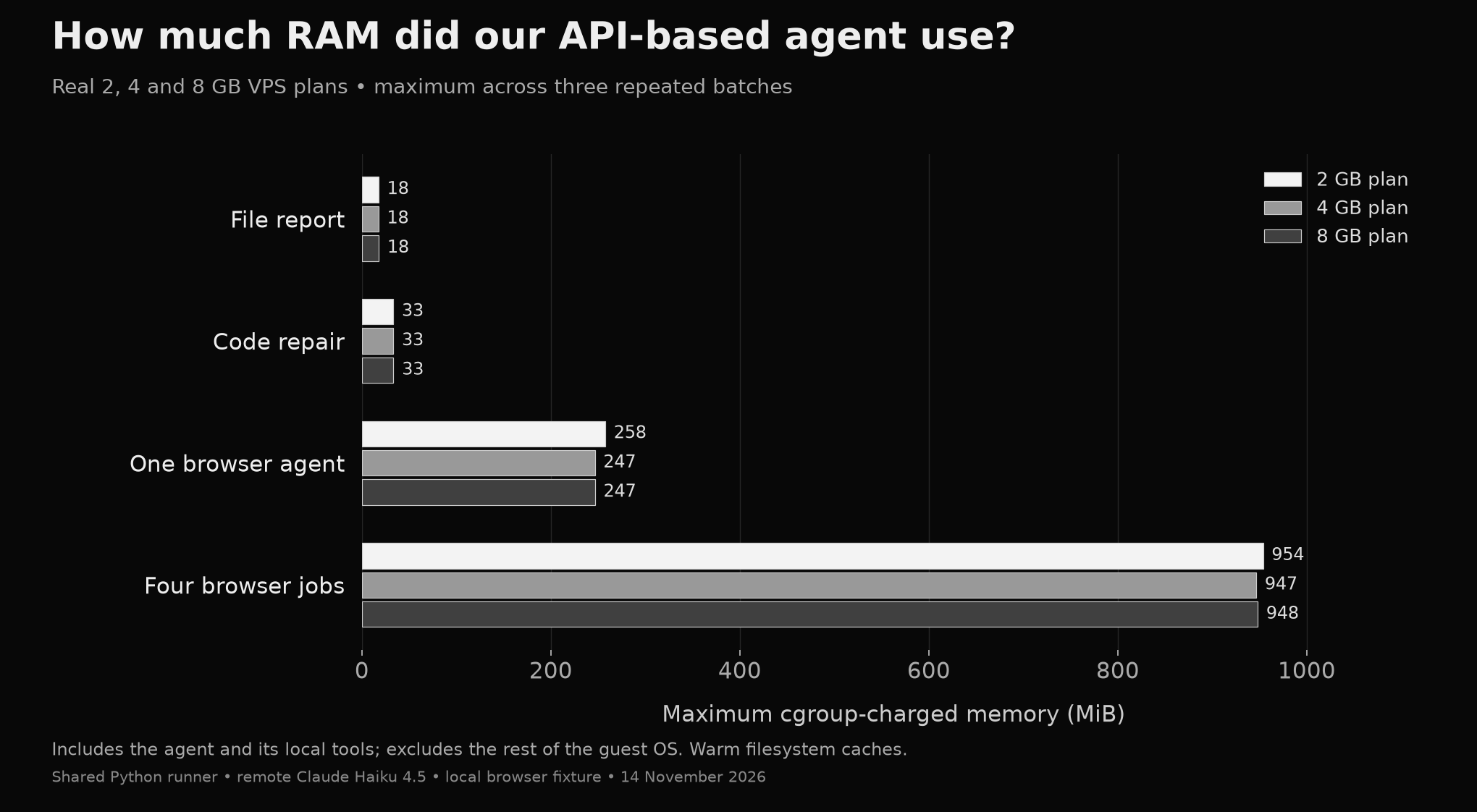
The four-browser row is the combined peak for four task contexts sharing one Python runner, with separate browser workers. It is not a per-agent requirement and should not be divided by four to size an unrelated application.
How much guest memory was available?
We sampled Linux MemAvailable separately: an estimate of memory available to new applications without swapping, including reclaimable cache. It is not a reserved allowance for extra services. The figures below are the lowest sampled values across all measured batches, rounded to the nearest MiB.
| Plan | Lowest available memory | Validated jobs |
|---|---|---|
| 2 GB | 704 MiB | 21 / 21 |
| 4 GB | 2,547 MiB | 21 / 21 |
| 8 GB | 6,533 MiB | 21 / 21 |
All 63 jobs across 36 batches passed separate output and trace checks. This was an internal test, not external certification. No measured batch recorded an out-of-memory kill or swap use. Median slowest-job durations ranged from about 7 to 14 seconds across the tested plan/scenario combinations. Completion of these brief tasks does not establish long-term stability or a universal safe margin.
The model ran elsewhere; the tools ran on the VPS
We tested a small Python agent that calls a hosted Claude Haiku 4.5 model. The model chose tool calls and their arguments. The VPS ran the agent loop, file operations, Python tests and Chromium.
The model's weights were not loaded into VPS memory. These results therefore say nothing about the RAM needed to run an LLM locally. They also do not measure the overhead of Claude Code, OpenClaw, n8n or another full agent framework.
What each task did
- File report: inspect a synthetic 10,000-row order CSV, calculate the paid Netherlands order count and revenue, and save an exact JSON report.
- Code repair: fix a Python tag-normalisation function and pass six supplied tests. We checked that the test source was unchanged and reviewed the generated implementation.
- One browser job: launch headless Chromium, filter a local 2,000-item catalogue by country and stock, then save the count and total shown in the browser.
- Four browser jobs: run four independent task contexts and separate browser workers concurrently, sharing one threaded Python runner. This is not four separately installed full agent frameworks.
All records were synthetic. The browser fixture was a local test application, not a live commercial website. No artificial memory filler was part of a measured agent task.
How we checked completion
A model saying “done” did not count as success. We compared the CSV and browser reports with independently calculated integer totals. For code repair, we required six passing tests, unchanged test files and a review of the edited module.
A separate trace-checking script checked the browser's open, country-selection and stock-filter commands and confirmed that none used bypass tools such as Python calculations. The traces retain model tool requests and final validated artifacts; they do not retain each local tool-result body. That limits what can be reconstructed from the logs.
Before collection, deliberately broken code failed validation and a known repair passed. A separate known-allocation control verified the memory counter. Those controls and setup pilots are excluded from the comparison.
What the memory numbers include
The primary measurement is the Linux cgroup's kernel-recorded peak for each batch. It includes the agent runner, local child processes, fixture preparation, validation and memory charged to that group, including file cache. It excludes the rest of the guest OS and is not an exact portable RAM requirement.
We separately sampled guest available memory, proportional process memory, memory pressure, swap and OOM counters about once per second. Sampled headroom can miss brief dips. Browser packages and fixture controls had run during preparation, so these are warm-cache trials with fresh task processes, not cold-boot tests. See the Linux kernel documentation for cgroup memory accounting and process and guest-memory metrics.
What this test cannot establish
We tested one VPS of each size on the same underlying host, with three repeats per scenario. Repeats on one machine are not independent hardware replications. Real websites, larger repositories, longer histories, databases and other frameworks can have very different memory demands.
The plans also have different CPUs: one, two and four vCPUs. Remote model latency is part of elapsed time. A faster result on a larger plan cannot be attributed to RAM alone.
We did not test below 2 GB, a full production traffic mix, multi-day memory growth or local model inference. Passing this workload does not establish the minimum RAM an arbitrary AI agent needs.
Choosing between 2, 4 and 8 GB
2 GB is a tested starting point for this small API-based runner. It completed the file report, tiny code repair and browser fixture, even with four browser jobs in progress. We did not test a lower-memory plan, so this does not establish a minimum.
4 GB buys more room for additional work. A database, automation platform, larger repository or heavier browser pages could change the result. We did not test those combinations, so the extra capacity is headroom rather than a measured requirement for this agent.
8 GB needs a workload reason. More concurrent processes, indexing or other services may justify it. The tasks here did not establish an 8 GB requirement, and this test cannot predict which local LLM would fit.
For your own deployment, measure after setup and during representative work. Include the browser's child processes, check guest available memory and OOM events, and allow for spikes. Our week-long memory test explains why a short successful run is a different question from behaviour over days.
Common questions
Is 2 GB enough for AI agent tooling? It was enough for this small hosted-model Python runner and every task we tested. That result does not cover every agent framework, website, repository or concurrent workload.
Does a larger remote AI model need more VPS RAM? The remote model's weights are stored and processed elsewhere. Your VPS still needs memory for its runtime, task history, inputs and local tools. Changing the hosted model does not make those local costs disappear.
What did the browser workloads use? On the 2 GB plan, the one-browser batch peaked at 258 MiB and the four-browser batch at 954 MiB. Those are combined workload-group peaks, not isolated browser allocations. The browser used a local synthetic catalogue; other pages can behave differently.
Did 8 GB make the agent faster? The four-browser batches had median slowest-job durations of 13.96 seconds on 2 GB, 10.59 seconds on 4 GB and 9.33 seconds on 8 GB. These figures include remote model calls, and the plans have one, two and four vCPUs respectively. They do not establish a speed benefit caused by extra RAM.
Can I use these figures to size a local LLM? No. We did not load model weights or perform model inference on the VPS. Local inference needs its own model, quantisation, context and hardware measurements.